Custom MOH not working

yaboc

New Member
Nov 23, 2017
26
2
3
35
Hi,

Does anyone have custom MOH working? I created a custom category (named custom), added 8khz/16khz wav files, set the DID with the MOH, but when I put the call on hold, I'm still getting the default MOH.

in the fs_cli console

[WARNING] mod_local_stream.c:875 Unknown source custom, trying 'default'

I did flush cache and reloaded the stream module
fs_cli -x 'reload mod_local_stream'

the files are present in /usr/share/freeswitch/sounds/music/pbx.domain.com/custom/1600 and /custom/8000

any pointers on why this is not working
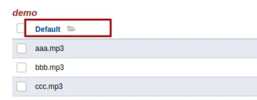
 
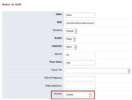
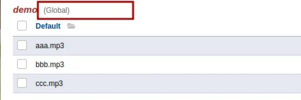
There are two types of custom MOH you can set up - per domain and global. Screenshots below show the global verson. Also, make sure it matches everything exactly as you see in the screenshots.

1767749261083.png1767749323707.png
After making this change the label global should be shown now

1767749371310.png
Advanced > Variables includes a variable named hold_music, set to local_stream://default, representing the Global music on hold category called "default".

To update the global music on hold to a new track uploaded in Applications > Music on Hold under a category named "demo," you should change the default value from local_stream://default to local_stream://demo, which plays the music from the demo category.

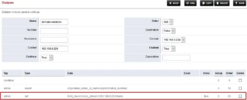
If the music on hold is for a specific domain, then you will need to adjust the domain-vairables dialplan and add
local_stream://customer_domain_name/demo as per screenshot

1767749569805.png

IMPORTANT STEP!!
2. Go to Status > SIP Status and Flush Cache.
3. After Making sure there are no current calls on hold, reload mod_local_stream under Advanced> Modules> Streams / Files. Make sure Local Stream (mod_local_stream) is displayed as stopped and then start mod_local_stream again. Also, make sure the module is enabled.

!!!!!! mod_local_stream will not restart if it is currently in use (active calls on hold)
 
  • Like
Reactions: yaboc
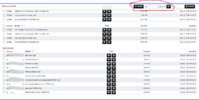
On the Applications > Music on Hold screen did you:
1) Click add on the upper right of the screen
2) Then click the + next to catagory
3) Select the file of music to upload
4) Click Upload

1767749797040.png
 
  • Like
Reactions: yaboc
@pbxgeek i added my wav files per domain like @kenn10's screenshot and after editing dialplan domain-variables as you showed my custom moh is now working. thank you guys! ill book this thread if i want to change global moh as well.