TLS working on Active but not Standby in HA

yaboc

New Member
Nov 23, 2017
15
2
3
35
Hi

I followed HA Docs and got the Active/Standby working fine with DB/FILE replication.

I pulled LE wild cert from my reverse proxy and set it up on Active node and everything works fine. I can connect with my phone using TLS. When i copied all.pem over to Standby node, created all symlinks, and restarted freeswitch i do not see 5061 TLS on internal/external profile in SIP Status so the handset doesn't connect over TLS. All variables are the same between the nodes since DB replication takes care of that. Any pointers as to where i should look? Thank you in advance.
 
On the second server, you need to go to Advanced -> Variables. Open any of the existing variables and hit save. It will help write all FreeSwitch variables into the local XML file. Then go to Status -> SIP Status and flush the cache and reload XML. Then restart the FreeSwitch service. You should now have the TLS profile started on the backup server too. To verify, go back to the SIP Status page and check that port 5061 is running.
 
  • Like
Reactions: yaboc
On the second server, you need to go to Advanced -> Variables. Open any of the existing variables and hit save. It will help write all FreeSwitch variables into the local XML file. Then go to Status -> SIP Status and flush the cache and reload XML. Then restart the FreeSwitch service. You should now have the TLS profile started on the backup server too. To verify, go back to the SIP Status page and check that port 5061 is running.
thanks @pbxgeek that worked a treat. This only has to be done once or everytime certs updated ? eventually i want to script the whole renewal process once i get everything working.

when i try to connect with a softphone on my pc i connect fine and can listen to MOH. when i do the same on my softphone on cell (groundwire/zoiper tried both) connected to wifi (same domain/different ext) i can listed to default MOH via feature code but it cuts off after 30 seconds.
Any tips and tricks for HA cluster in two different locations each behind pfsense and connected for replication via ipsec.
Just strange that one ext is fine and the other isn't.
i can't really change ext-rtp-ip and ext-sip-ip as recommended in threads with NAT issues in HA config?

btw Happy New Year everyone!
 
Last edited:
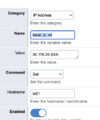
Yes, you can change those, and you absolutely should change them. The trick is to use hostname to apply the variable to the correct server. You go to Advanced -> Variable and set up the same variable twice with two different hostnames. Hostnames must match the actual hostname of your server, and each server should have a unique hostname in the HA. In my screenshot, notice how I used tx01 as a hostname for the local_ip_v4 variable. You can apply the same logic to any other variable. Make sure to flush the cache, reload the XML, and restart FreeSWITCH to make sure the changes apply.

1767331076762.png
 
  • Like
Reactions: yaboc
thanks @pbxgeek

Getting closer, I think.

I reentered each var again with the corresponding public IP and respective hostnames (not fqdn pbx1.domain.com, just pbx1/pbx2)

I'm able to get call in/out with twillio trunk which points at pbx.domain.com, where pbx1.domain.com and pbx2.domain.com are CNAMEs for pbx.domain.com. When I'm on the pbx1.domain.com domain calls go in and out, when i failover to pbx2.spcfix.com i get
407 Proxy Authentication Required from twillio.
All FSPBX settings are the same since it's clustered, and firewall rules are the same.

Twillio says this regarding this error

The call is being rejected by the PBX with a '407 Proxy Authentication Required' Error​


Cause: Your PBX does not have the Twilio SIP Trunking IP addresses configured/allowed as Peers.

  • Update the configuration on your PBX so that the Twilio SIP Trunking signaling IP addresses for each applicable region are Trusted Peers. Addresses are per our IP addresses
ACLs are the same on both instances since it's replicating, and I have all the IP addresses in; otherwise I wouldn't be getting calls on the primary. Any pointers?
 
I'm glad you are making progress. So far, I was able to give you solutions, but this last one requires further investigation that may require a remote session to find out what is really happening on the backup server. We have support plans for that if you are interested.

Otherwise, my wild guess is that ACLs are not being applied correctly on the backup server. SNGREP and FS SLI would shed light on this problem and help with further troubleshooting. I'm confident that those two tools will help resolve it.