Hello, Can I upgrade fspbx from 1.9.6 to 2.0.2 directly or do I have to do a sequential upgrade without messing up the pbx
Thank you
Thank you


 www.fspbx.com
Thank youUse the official guide here: https://www.fspbx.com/docs/freeswitch-upgrade/
You need to upgrade FS PBX and then upgrade FreeSwitch. Both must be updated in order.
Thank youA small correction. I think @kenn10 posted the wrong URL. The official upgrade guide for FS PBX is here:
How to update | FS PBX – Open Source PBX Dashboard for VoIP Providers
This guide explains how to update FS PBX in both single-server and multinode deployments.
The URL above is for upgrading FreeSWITCH; if you decide to run it, you'll have their bug fixes too.
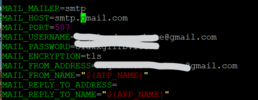
Thanks for your response..Check the environment settings at /var/www/fspbx/.env The .env file holds the email settings:
View attachment 5164
cd /var/www/fspbx
php artisan config:cache
php artisan app:updatetail -f /var/www/fspbx/storage/logs/laravel.logthe log displayed the same error that I mentioned earlier.. it's puzzling, the same smtp setting works on a different testing fspbx without any problem...Hmm. I don't know then. My system updated and email kept working. In fact, I'm on 2.0.7 now with no issues of my own (thankfully.)
Have you tried:
Code:cd /var/www/fspbx php artisan config:cache php artisan app:update
Then tail the log to see what is happening when it tries to send email:
Code:tail -f /var/www/fspbx/storage/logs/laravel.log
What I did was,used a different SMTP settings ( new login, new password, new smtp settings) from a different ispconfig email server and that worked, but for the life of me I still cannot figure out why my old setting stop working after an upgrade to 2.7. Because my last settings still works with FSPBX that was not upgraded.My upgrade ended up with some pages giving a 500 error.
The fix was:
php artisan config:clear
php artisan cache:clear
php artisan route:clear
php artisan view:clear
For anyone having a similar issue. All appears to be fine after that.