


1.8.5
- Thread starter islandtech
- Start date
You are using an out of date browser. It may not display this or other websites correctly.
You should upgrade or use an alternative browser.
You should upgrade or use an alternative browser.
- Status
- Not open for further replies.


I'm running it on two clouds. FS PBX keeps getting better with the responsive, rapid updates. FreeSWITCH has its quirks but FS PBX helps refine them.Good morning
Getting my feet with FS PBX 1.8.5
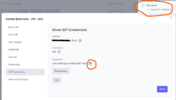
That's odd. Works for me using Chrome browser. I am able to copy using the copy icon and paste to a notepad as a test. See below:extensions generated password copy to clipboard icon doesn't work
And yeah, it takes a lot of mental gymnastics to translate FS PBX/FusionPBX/FreeSWITCH from a brain hard-coded for Asterisk/FreePBX. Six to eight months in, I still have a hard time with it but I've replicated most things I was doing with FreePBX.
When you get more comfortable, you'll learn you can write lua scripts for FreeSWITCH and call them from within the dial plan.
Last edited:
@islandtech
Welcome to FS PBX!
If your browser is not allowing you to copy the password using the copy button, you should still be able to manually highlight the password and copy it that way.
This is the first time I’ve heard of this being an issue. I tested it on my system, and the copy function worked as expected.
Welcome to FS PBX!
If your browser is not allowing you to copy the password using the copy button, you should still be able to manually highlight the password and copy it that way.
This is the first time I’ve heard of this being an issue. I tested it on my system, and the copy function worked as expected.
@kenn10 Thank you for the kind words. A lot of sleepless nights brought us here, so it truly means a lot to hear that someone appreciates the effort we’ve put into this.FS PBX keeps getting better with the responsive, rapid updates.
Rebooted the server
Tried safari, chrome, firefox, duckduckgo none of the copy to clipboard works.
Clicking on it, a blue circle appears around the icon but does not copy.
Manual copy does work
copy to clipboard link in other apps work
Tried safari, chrome, firefox, duckduckgo none of the copy to clipboard works.
Clicking on it, a blue circle appears around the icon but does not copy.
Manual copy does work
copy to clipboard link in other apps work
@islandtech try updating to the latest version and see if the issue persists. I cannot reproduce this issue on any servers. This is strange
- Status
- Not open for further replies.