adding members to ring group not working

yaboc

Member
Nov 23, 2017
59
4
8
35
hi

i created few ring groups but when i hit save and edit again the selected member/s are not there. is this a bug?
also is there a way to set a cid prefix for ring groups in the gui? in case i want to see if the call is meant for sales/billing/support dept. and ext is a member of multiple ring groups. etc. (like Virtual Receptionist which has cid prefix option)
im on 1.6.8
 
Last edited:
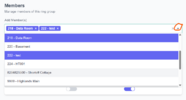
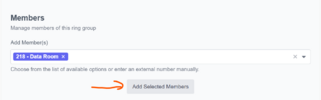
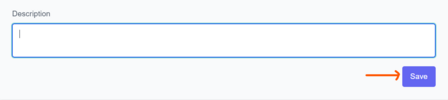
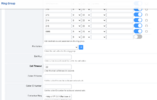
When you are adding a new member to the ring group, select the extension(s) and it will still show other extensions. Click the uparrow on the upper right of the selection to close it. Then click the Add Selected Members button to add it to your ring group. Finally, click Save at the bottom right of the screen.

I do not know of a way to add a caller-id prefix for the ring group.

1777227359489.png
1777227114401.png
1777227194530.png
 
Last edited:
  • Like
Reactions: yaboc
This is actually something many of our customers get wrong because the "add members" is hidden by the box. So they click Save instead. Despite us mentioning it in our little write-up for customer (who never read it anyway). I think there is room for improvement by not obscuring the "add members" button.
 
  • Like
Reactions: yaboc
I think there is room for improvement by not obscuring the "add members" button.
I agree. The box is much wider than necessary for the extension descriptions so why not make the box smaller and put the "Add Selected Members" button to the right side of the box instead of under it. @pbxgeek might want to look at that for a minor redesign of the screen. I've added this to the issues list as issue #429. https://github.com/nemerald-voip/fspbx/issues/429
 
Last edited:
  • Like
Reactions: yaboc
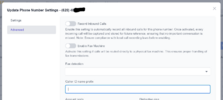
I think I found where you can add a CID prefix for your ring group. You do it on the advanced tab of the Phone Numbers. In this case on the inbound DID for the ring group, you can add a prefix to the incoming caller-id. It isn't quite the same as adding a prefix for all calls to the ring group but it handles incoming calls from outside the system.

1777241057135.png
 
thanks @kenn10 . i did see global prefix for the DID, but once it hits Virtual Receptionist (IVR) which routes to specific ring groups the prefix would remain the same for all. My idea was to have prefix on Ring Group to distinguish which option/department was pressed if ext is a member of multiple ring groups. i did see that option in fusionpbx but i guess it's not implemented (yet?) in fspbx.
 
i guess it's not implemented (yet?) in fspbx.
Correct. FreePBX does it but I don't see an option in the GUI for FS PBX or FusionPBX. You should submit an enhancement request on the FS PBX issues list at
 
Correct. FreePBX does it but I don't see an option in the GUI for FS PBX or FusionPBX. You should submit an enhancement request on the FS PBX issues list at
strange in the docs i linked it's not on the screenshot but available as one of the listed options. it's clearly seen on fusionpbx ring groups video
unless it's something that's been removed
ill ask for that enhancement feature on github. thanks @kenn10
 
On current FusionPBX, the caller-id name and number, if specified, are what is sent out when the ring group rings an external number. It is not a caller-id prefix for incoming calls to ring group members. That is exactly how it works in FS PBX.

1777253600189.png
 
  • Like
Reactions: yaboc
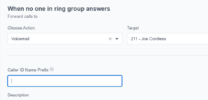
To show the caller ID prefix for ring groups, simply enable the permission to see it. It will work the same as on the Phone Number page.

I'll think of ways to redesign the Add Ring Group Members button to make it more visible. Thanks to all for your feedback.
 
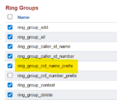
OK! That does the trick. It has to be set under Advanced > Group Manager then click on the permissions for Superadmin and scroll down to Ring Groups Then click the check box next to Caller-ID Name Prefix to enable. Save, log out and log back in to see the field.

1777285835771.png
1777285490178.png