Fax Stuck Sending

Starburst

New Member
Jul 8, 2026
11
0
1
54
There is a fax that is stuck on (Sending) 1903Z.

Can't find where the Queue is at, or if there is one.
Most of the docks are a little old, when I guess FS PBX and FusionPBX where close in function.

If someone knows where I can get this unstuck I would appreciate it.

Thanks
 
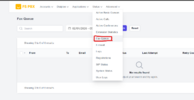
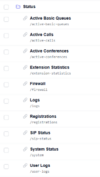
Fax Queue is under status.

I want to say it will time out after trying for so long. You can go to the logs and see what the status is, might give an idea on why it's stuck. It's also possible that it just didn't get/process the "success" message.
 
Don't see anything listed as a Fax Queue under Status.
Unless you mean Flush Cache?

Good part is it finally timed out. But would still like to know where it is, if this ever happened again.
It's one of the fax lines, I can send OK to all the others except 1. Which I'll look at later.

Running FS PBX 1.9.7
 
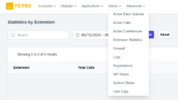
I'm on 1.9.4 but this shouldn't have changed. In the [Status] menu, it's the 5th time under [Extension Statistics].

If it's not there try going to "https://yourfspbx.url/faxqueue", maybe the link is missing.

You can also goto [Advanced] menu, [Menu Manager] option, then click on fspbx, and it will show all the available menu items. Scroll down under "Status" and see if "Fax Queue" is there. If not you can add it. If you aren't a superadmin, that may be why your not seeing it.
 
I'm on 1.9.4 but this shouldn't have changed. In the [Status] menu, it's the 5th time under [Extension Statistics].

If it's not there try going to "https://yourfspbx.url/faxqueue", maybe the link is missing.

You can also goto [Advanced] menu, [Menu Manager] option, then click on fspbx, and it will show all the available menu items. Scroll down under "Status" and see if "Fax Queue" is there. If not you can add it. If you aren't a superadmin, that may be why your not seeing it.

Wasn't listed here either. :/

Screenshot 2026-08-19 053919.png

Got it added. Shows I am logged in as a superadmin.
 
Last edited:
Thanks. It finally timed out.

But is weird, the install does everything. But the missing link was added per your suggestion.
 
The fax queue page was removed because we no longer use it. The link was automatically removed in one of the recent updates and is not available for any new installs. Putting it back doesn't help either because nothing is going to show there.

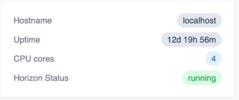
FS PBX now has its own queues powered by Horizon. Horizon status is visible on the dashboard.
1787160205949.png
To restart Horizon queues, you can run this command

Code:
php artisan horizon:terminate

The reason your fax was stuck sending is that you probably had an issue with the fax. If the other side is not accepting the fax, FS PBX would attempt to deliver it multiple times. It will eventually time out. What you need to do is to look at fax logs to see what the failure it. Then investigate the CDRs to find any issues with making calls, and also look at FreeSWITCH logs to find any problems with your routes/etc.

The bottom line is your fax was stuck sending because there was an issue with it, and the fax queue was trying multiple times before timing out.
 
  • Like
Reactions: RCCradio
I figured something was wrong, that's why I was trying to cancel it.
How many times does it attempt a fax, before giving up? 3?

If that menu won't show anything, I'll go ahead and remove it.