

I'm doing some testing as I'm planning to switch to FS PBX and am trying to configure a Groundwire softphone extension per a tuturial on Nerdvittles for setting up FS PBX.
I can get Groundwire to register on my FS PBX and receive calls when the app is open on the phone. It's when the app is closed I'm not able to receive calls. I'm guessing it has something to do with one of the firewall pieces but can't figure it out. I have FS PBX hosted on a Vultr instance. Per the other Nerdvittles article in setting up Groundwire that was linked from the FS PBX setup I have modified my /etc/iptables/rules.v4 as follows.
# // Acrobits whitelist entries for Acrobits push notification server
-A INPUT -s 159.65.167.207 -p udp -m udp --dport 5060:5069 -j ACCEPT
-A INPUT -s 159.65.186.176 -p udp -m udp --dport 5060:5069 -j ACCEPT
-A INPUT -s 159.65.251.173 -p udp -m udp --dport 5060:5069 -j ACCEPT
-A INPUT -s 159.65.252.186 -p udp -m udp --dport 5060:5069 -j ACCEPT
-A INPUT -s 159.65.253.49 -p udp -m udp --dport 5060:5069 -j ACCEPT
-A INPUT -s 159.65.252.186 -p udp -m udp --dport 5060:5069 -j ACCEPT
-A INPUT -s 159.65.253.49 -p udp -m udp --dport 5060:5069 -j ACCEPT
-A INPUT -s 159.89.179.103 -p udp -m udp --dport 5060:5069 -j ACCEPT
-A INPUT -s 162.243.226.164 -p udp -m udp --dport 5060:5069 -j ACCEPT
-A INPUT -s 165.227.65.164 -p udp -m udp --dport 5060:5069 -j ACCEPT
-A INPUT -s 165.227.115.186 -p udp -m udp --dport 5060:5069 -j ACCEPT
-A INPUT -s 165.227.182.9 -p udp -m udp --dport 5060:5069 -j ACCEPT
-A INPUT -s 165.227.184.188 -p udp -m udp --dport 5060:5069 -j ACCEPT
-A INPUT -s 165.227.190.186 -p udp -m udp --dport 5060:5069 -j ACCEPT
-A INPUT -s 165.227.210.221 -p udp -m udp --dport 5060:5069 -j ACCEPT
-A INPUT -s 165.227.223.68 -p udp -m udp --dport 5060:5069 -j ACCEPT
-A INPUT -s 167.99.48.91 -p udp -m udp --dport 5060:5069 -j ACCEPT
-A INPUT -s 167.99.119.203 -p udp -m udp --dport 5060:5069 -j ACCEPT
-A INPUT -s 167.99.119.244 -p udp -m udp --dport 5060:5069 -j ACCEPT
-I INPUT -s 165.227.103.7 -p tcp -m tcp --dport 443 -j ACCEPT
-A INPUT -s 104.131.30.133 -p tcp -m tcp --dport 5060:5069 -j ACCEPT
-A INPUT -s 143.198.16.177 -p tcp -m tcp --dport 5060:5069 -j ACCEPT
-A INPUT -s 157.245.211.111 -p tcp -m tcp --dport 5060:5069 -j ACCEPT
-A INPUT -s 159.203.80.157 -p tcp -m tcp --dport 5060:5069 -j ACCEPT
-A INPUT -s 159.203.81.60 -p tcp -m tcp --dport 5060:5069 -j ACCEPT
-A INPUT -s 159.65.189.13 -p tcp -m tcp --dport 5060:5069 -j ACCEPT
-A INPUT -s 159.89.179.105 -p tcp -m tcp --dport 5060:5069 -j ACCEPT
-A INPUT -s 165.227.108.121 -p tcp -m tcp --dport 5060:5069 -j ACCEPT
-A INPUT -s 165.227.220.19 -p tcp -m tcp --dport 5060:5069 -j ACCEPT
-A INPUT -s 165.227.65.164 -p tcp -m tcp --dport 5060:5069 -j ACCEPT
-A INPUT -s 167.172.251.36 -p tcp -m tcp --dport 5060:5069 -j ACCEPT
-A INPUT -s 167.71.161.233 -p tcp -m tcp --dport 5060:5069 -j ACCEPT
-A INPUT -s 167.71.175.215 -p tcp -m tcp --dport 5060:5069 -j ACCEPT
-A INPUT -s 167.99.112.57 -p tcp -m tcp --dport 5060:5069 -j ACCEPT
-A INPUT -s 174.138.70.189 -p tcp -m tcp --dport 5060:5069 -j ACCEPT
-A INPUT -s 174.138.91.89 -p tcp -m tcp --dport 5060:5069 -j ACCEPT
-A INPUT -s 64.225.12.13 -p tcp -m tcp --dport 5060:5069 -j ACCEPT
-I INPUT -p tcp -m tcp --dport 7343 -j ACCEPT
-I INPUT -p tcp -m tcp --dport 4998 -j ACCEPT
-I INPUT -p tcp -m tcp --dport 24998 -j ACCEPT
-I INPUT -p udp -m udp --dport 4998 -j ACCEPT
I have changed the SIP port to something different and have tried changing the 5060:5069 to the new sip port but that did not fix the problem. I just didn't want to post my new sip port above.
I then modified the fail2ban configuration as follows.
ignoreip = 159.65.167.207 159.65.186.176 159.65.251.173 159.65.252.186 159.65.253.49 159.89.179.103 162.243.226.164 165.227.65.164 165.227.115.186 165.227.182.9 165.227.184.188 165.227.190.186 165.227.210.221 165.227.223.68 167.99.48.91 167.99.119.203 167.99.119.244 143.198.16.177 167.71.161.233 64.225.12.13 167.99.112.57 174.138.70.189 159.65.189.13 174.138.91.89 157.245.211.111 165.227.108.121 104.131.30.133 159.89.179.105 159.203.80.157 159.203.81.60 165.227.220.197 167.71.175.215 167.172.251.36
I have also created an Access Control List in FS PBX as follows.
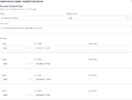
It's not shown but the list has all the current Acrobits ip addresses above.
In my FS PBX system I don't have an Event Guard displayed on the Dashboard so can't see if anything is being blocked and possibly offer a clue.
When I do a Push Notifications Test on Groundwire it does say that a Pust Test Has Arrived.
I am seeing the push notifications when I do a tcpdump I get the following. I did blank my server ip and changed it to port 5060 for purposes of this post. It is actually going to the new port I assigned.
22:06:16.313438 enp1s0 In IP (tos 0x0, ttl 56, id 56933, offset 0, flags [DF], proto TCP (6), length 60)
64.225.12.13.52415 > ***.**.**.***.5060: Flags , cksum 0x7a18 (correct), seq 170095694, win 64240, options [mss 1460,sackOK,TS val 2429037741 ecr 0,nop,wscale 7], length 0
I have been trying various suggestions on google ai mode but so far non of the changes they suggested work.
Any assistance to figure this out would be appreciated.
Thanks.
I can get Groundwire to register on my FS PBX and receive calls when the app is open on the phone. It's when the app is closed I'm not able to receive calls. I'm guessing it has something to do with one of the firewall pieces but can't figure it out. I have FS PBX hosted on a Vultr instance. Per the other Nerdvittles article in setting up Groundwire that was linked from the FS PBX setup I have modified my /etc/iptables/rules.v4 as follows.
# // Acrobits whitelist entries for Acrobits push notification server
-A INPUT -s 159.65.167.207 -p udp -m udp --dport 5060:5069 -j ACCEPT
-A INPUT -s 159.65.186.176 -p udp -m udp --dport 5060:5069 -j ACCEPT
-A INPUT -s 159.65.251.173 -p udp -m udp --dport 5060:5069 -j ACCEPT
-A INPUT -s 159.65.252.186 -p udp -m udp --dport 5060:5069 -j ACCEPT
-A INPUT -s 159.65.253.49 -p udp -m udp --dport 5060:5069 -j ACCEPT
-A INPUT -s 159.65.252.186 -p udp -m udp --dport 5060:5069 -j ACCEPT
-A INPUT -s 159.65.253.49 -p udp -m udp --dport 5060:5069 -j ACCEPT
-A INPUT -s 159.89.179.103 -p udp -m udp --dport 5060:5069 -j ACCEPT
-A INPUT -s 162.243.226.164 -p udp -m udp --dport 5060:5069 -j ACCEPT
-A INPUT -s 165.227.65.164 -p udp -m udp --dport 5060:5069 -j ACCEPT
-A INPUT -s 165.227.115.186 -p udp -m udp --dport 5060:5069 -j ACCEPT
-A INPUT -s 165.227.182.9 -p udp -m udp --dport 5060:5069 -j ACCEPT
-A INPUT -s 165.227.184.188 -p udp -m udp --dport 5060:5069 -j ACCEPT
-A INPUT -s 165.227.190.186 -p udp -m udp --dport 5060:5069 -j ACCEPT
-A INPUT -s 165.227.210.221 -p udp -m udp --dport 5060:5069 -j ACCEPT
-A INPUT -s 165.227.223.68 -p udp -m udp --dport 5060:5069 -j ACCEPT
-A INPUT -s 167.99.48.91 -p udp -m udp --dport 5060:5069 -j ACCEPT
-A INPUT -s 167.99.119.203 -p udp -m udp --dport 5060:5069 -j ACCEPT
-A INPUT -s 167.99.119.244 -p udp -m udp --dport 5060:5069 -j ACCEPT
-I INPUT -s 165.227.103.7 -p tcp -m tcp --dport 443 -j ACCEPT
-A INPUT -s 104.131.30.133 -p tcp -m tcp --dport 5060:5069 -j ACCEPT
-A INPUT -s 143.198.16.177 -p tcp -m tcp --dport 5060:5069 -j ACCEPT
-A INPUT -s 157.245.211.111 -p tcp -m tcp --dport 5060:5069 -j ACCEPT
-A INPUT -s 159.203.80.157 -p tcp -m tcp --dport 5060:5069 -j ACCEPT
-A INPUT -s 159.203.81.60 -p tcp -m tcp --dport 5060:5069 -j ACCEPT
-A INPUT -s 159.65.189.13 -p tcp -m tcp --dport 5060:5069 -j ACCEPT
-A INPUT -s 159.89.179.105 -p tcp -m tcp --dport 5060:5069 -j ACCEPT
-A INPUT -s 165.227.108.121 -p tcp -m tcp --dport 5060:5069 -j ACCEPT
-A INPUT -s 165.227.220.19 -p tcp -m tcp --dport 5060:5069 -j ACCEPT
-A INPUT -s 165.227.65.164 -p tcp -m tcp --dport 5060:5069 -j ACCEPT
-A INPUT -s 167.172.251.36 -p tcp -m tcp --dport 5060:5069 -j ACCEPT
-A INPUT -s 167.71.161.233 -p tcp -m tcp --dport 5060:5069 -j ACCEPT
-A INPUT -s 167.71.175.215 -p tcp -m tcp --dport 5060:5069 -j ACCEPT
-A INPUT -s 167.99.112.57 -p tcp -m tcp --dport 5060:5069 -j ACCEPT
-A INPUT -s 174.138.70.189 -p tcp -m tcp --dport 5060:5069 -j ACCEPT
-A INPUT -s 174.138.91.89 -p tcp -m tcp --dport 5060:5069 -j ACCEPT
-A INPUT -s 64.225.12.13 -p tcp -m tcp --dport 5060:5069 -j ACCEPT
-I INPUT -p tcp -m tcp --dport 7343 -j ACCEPT
-I INPUT -p tcp -m tcp --dport 4998 -j ACCEPT
-I INPUT -p tcp -m tcp --dport 24998 -j ACCEPT
-I INPUT -p udp -m udp --dport 4998 -j ACCEPT
I have changed the SIP port to something different and have tried changing the 5060:5069 to the new sip port but that did not fix the problem. I just didn't want to post my new sip port above.
I then modified the fail2ban configuration as follows.
ignoreip = 159.65.167.207 159.65.186.176 159.65.251.173 159.65.252.186 159.65.253.49 159.89.179.103 162.243.226.164 165.227.65.164 165.227.115.186 165.227.182.9 165.227.184.188 165.227.190.186 165.227.210.221 165.227.223.68 167.99.48.91 167.99.119.203 167.99.119.244 143.198.16.177 167.71.161.233 64.225.12.13 167.99.112.57 174.138.70.189 159.65.189.13 174.138.91.89 157.245.211.111 165.227.108.121 104.131.30.133 159.89.179.105 159.203.80.157 159.203.81.60 165.227.220.197 167.71.175.215 167.172.251.36
I have also created an Access Control List in FS PBX as follows.
It's not shown but the list has all the current Acrobits ip addresses above.
In my FS PBX system I don't have an Event Guard displayed on the Dashboard so can't see if anything is being blocked and possibly offer a clue.
When I do a Push Notifications Test on Groundwire it does say that a Pust Test Has Arrived.
I am seeing the push notifications when I do a tcpdump I get the following. I did blank my server ip and changed it to port 5060 for purposes of this post. It is actually going to the new port I assigned.
22:06:16.313438 enp1s0 In IP (tos 0x0, ttl 56, id 56933, offset 0, flags [DF], proto TCP (6), length 60)
64.225.12.13.52415 > ***.**.**.***.5060: Flags , cksum 0x7a18 (correct), seq 170095694, win 64240, options [mss 1460,sackOK,TS val 2429037741 ecr 0,nop,wscale 7], length 0
I have been trying various suggestions on google ai mode but so far non of the changes they suggested work.
Any assistance to figure this out would be appreciated.
Thanks.