LAN/Local IP Address in Status > Registration

kenn10

Member
Sep 11, 2018
106
22
18
70
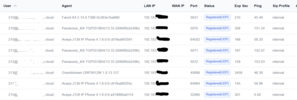
Prior to either the FreeSwitch upgrade or one of the FS PBX upgrades, my Status > Registrations would show a local LAN IP for each phone and then their WAN IP address. Now they all show the WAN IP address in the LAN column and nothing in the WAN IP column. Is this expected behavior now?
1786843003060.png
 
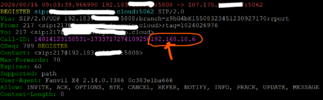
In the Register transaction, the phone's local LAN IP is in the message as part of the Call-ID from some phones (but not all) but that is not being picked up to display in the registration list.
1786886489025.png
 
@kenn10
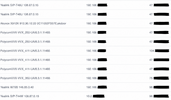
I'm seeing both local and external IP addresses for various phones on my system
ChatGPT Image Aug 17, 2026, 08_14_25 AM.pngChatGPT Image Aug 17, 2026, 08_12_05 AM.png
I don't have a Fanvil phone to try on my system, so I can't be sure what it displays. I would imagine it will at least display something.
 
It isn't just Fanvil. As you can see on my original post, none of the phones show LAN and WAN IP addresses correctly. The phones have the FQDN in their main, outbound proxy, and domain listings. Do you have any pointers on how you have yours set up? My FSPBX is cloud-based.
 
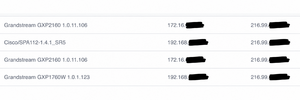
Yes, I saw other phones in your screenshot, but I don't have any of those except for Grandstream, and my screenshot shows that Grandstream phones do show IP addresses. As well as other phones. I'm in the cloud too. I checked a few production servers, and they all show something in the WAN IP field.

Check the FreeSWITCH registration table and see if FreeSWITCH stores it on your server. Maybe something in your config is preventing it.
 
I'm not getting the local IPs showing in FreeSwitch either using these commands. I'll have to dig some more. I notice my extensions don't show NAT on the registered line any more.

Code:
sofia status profile internal reg
show registrations
 
I only have a yealink and a fanvil on my test system
FreeSWITCH Version 1.11.1-release+git~20260616T201954Z~19eca6a915~64bit

Registrations:
=================================================================================================
Call-ID: 577344004@192.168.xxx.xxx
User: 484@iti-fspbx.abcd.net
Contact: "484" <sip:484@192.168.xxx.xxx:5062;fs_nat=yes;fs_path=sip%3A484%4075.176.xxx.xx%3A5062>
Agent: Yealink SIP-T21P 34.72.0.76
Status: Registered(UDP-NAT)(unknown) EXP(2026-08-17 14:30:28) EXPSECS(3366)
Ping-Status: Reachable
Ping-Time: 0.00
Host: fspbx
IP: 75.176.xxx.xxx
Port: 5062
Auth-User: 484
Auth-Realm: iti-fspbx.abcd.net
MWI-Account: 484@iti-fspbx.abcd.net

Call-ID: 36945809564917-554966106536798@192.168.xxx.xxx
User: 250@iti-fspbx.abcd.net
Contact: "250 bob" <sip:250@75.176.xxx.xxx:5612;fs_nat=yes;fs_path=sip%3A250%4075.176.xxx.xxx%3A5612>
Agent: Fanvil X6U 2.4.13 0c383e3e3b39
Status: Registered(UDP-NAT)(unknown) EXP(2026-08-17 13:38:25) EXPSECS(243)
Ping-Status: Reachable
Ping-Time: 0.00
Host: fspbx
IP: 75.176.xxx.xxx
Port: 5612
Auth-User: 250
Auth-Realm: iti-fspbx.abcd.net
MWI-Account: 250@iti-fspbx.jayroe.net

Total items returned: 2
=================================================================================================
 
Mine is all over the show, always has been though. Some customers show public and private, others show only public, again others will on some phones both, on other phones not. Sometimes it will be the same model phone with different results. Fanvils typically have never shown the private IP address. This was the case with Fusion, and the same with FSPBX.

We have a number of Fusion boxes with NDLB-received-in-nat-reg-contact enabled on the internal profile. Upon reading a bit more, FS recommends to set this on a per customer level where required. Which can be done through extensions>advanced "rewrite port and ip" - which is apparently the same as NDLB-received-in-nat-reg-contact. We do this for some customers who have issues with NAT and in those cases we definitely only see the public ip.

 
On my Fanvil phone, exact phone, just changed registration to my FusionPBX address and it shows correctly:
1786993286435.png
 
Check if you have any of the NAT helper stuff enabled on the one and not the other? Then again, I just looked a customer who I know uses fanvils. Some phones show the LAN ip, others don't. Same location but different models and firmware versions............