LAN/Local IP Address in Status > Registration

kenn10

Member
Sep 11, 2018
109
22
18
70
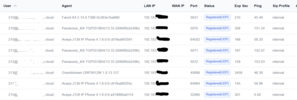
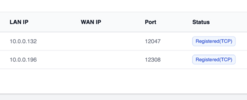
Prior to either the FreeSwitch upgrade or one of the FS PBX upgrades, my Status > Registrations would show a local LAN IP for each phone and then their WAN IP address. Now they all show the WAN IP address in the LAN column and nothing in the WAN IP column. Is this expected behavior now?
1786843003060.png
 
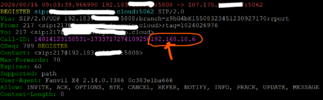
In the Register transaction, the phone's local LAN IP is in the message as part of the Call-ID from some phones (but not all) but that is not being picked up to display in the registration list.
1786886489025.png
 
@kenn10
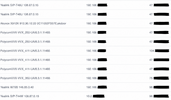
I'm seeing both local and external IP addresses for various phones on my system
ChatGPT Image Aug 17, 2026, 08_14_25 AM.pngChatGPT Image Aug 17, 2026, 08_12_05 AM.png
I don't have a Fanvil phone to try on my system, so I can't be sure what it displays. I would imagine it will at least display something.
 
It isn't just Fanvil. As you can see on my original post, none of the phones show LAN and WAN IP addresses correctly. The phones have the FQDN in their main, outbound proxy, and domain listings. Do you have any pointers on how you have yours set up? My FSPBX is cloud-based.
 
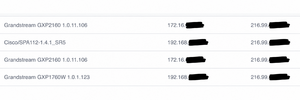
Yes, I saw other phones in your screenshot, but I don't have any of those except for Grandstream, and my screenshot shows that Grandstream phones do show IP addresses. As well as other phones. I'm in the cloud too. I checked a few production servers, and they all show something in the WAN IP field.

Check the FreeSWITCH registration table and see if FreeSWITCH stores it on your server. Maybe something in your config is preventing it.
 
I'm not getting the local IPs showing in FreeSwitch either using these commands. I'll have to dig some more. I notice my extensions don't show NAT on the registered line any more.

Code:
sofia status profile internal reg
show registrations
 
I only have a yealink and a fanvil on my test system
FreeSWITCH Version 1.11.1-release+git~20260616T201954Z~19eca6a915~64bit

Registrations:
=================================================================================================
Call-ID: 577344004@192.168.xxx.xxx
User: 484@iti-fspbx.abcd.net
Contact: "484" <sip:484@192.168.xxx.xxx:5062;fs_nat=yes;fs_path=sip%3A484%4075.176.xxx.xx%3A5062>
Agent: Yealink SIP-T21P 34.72.0.76
Status: Registered(UDP-NAT)(unknown) EXP(2026-08-17 14:30:28) EXPSECS(3366)
Ping-Status: Reachable
Ping-Time: 0.00
Host: fspbx
IP: 75.176.xxx.xxx
Port: 5062
Auth-User: 484
Auth-Realm: iti-fspbx.abcd.net
MWI-Account: 484@iti-fspbx.abcd.net

Call-ID: 36945809564917-554966106536798@192.168.xxx.xxx
User: 250@iti-fspbx.abcd.net
Contact: "250 bob" <sip:250@75.176.xxx.xxx:5612;fs_nat=yes;fs_path=sip%3A250%4075.176.xxx.xxx%3A5612>
Agent: Fanvil X6U 2.4.13 0c383e3e3b39
Status: Registered(UDP-NAT)(unknown) EXP(2026-08-17 13:38:25) EXPSECS(243)
Ping-Status: Reachable
Ping-Time: 0.00
Host: fspbx
IP: 75.176.xxx.xxx
Port: 5612
Auth-User: 250
Auth-Realm: iti-fspbx.abcd.net
MWI-Account: 250@iti-fspbx.jayroe.net

Total items returned: 2
=================================================================================================
 
Mine is all over the show, always has been though. Some customers show public and private, others show only public, again others will on some phones both, on other phones not. Sometimes it will be the same model phone with different results. Fanvils typically have never shown the private IP address. This was the case with Fusion, and the same with FSPBX.

We have a number of Fusion boxes with NDLB-received-in-nat-reg-contact enabled on the internal profile. Upon reading a bit more, FS recommends to set this on a per customer level where required. Which can be done through extensions>advanced "rewrite port and ip" - which is apparently the same as NDLB-received-in-nat-reg-contact. We do this for some customers who have issues with NAT and in those cases we definitely only see the public ip.
 
Check if you have any of the NAT helper stuff enabled on the one and not the other? Then again, I just looked a customer who I know uses fanvils. Some phones show the LAN ip, others don't. Same location but different models and firmware versions............
 
@kenn10 I just saw your exact case on one production server. This likely isn't an FS PBX vs. FusionPBX issue, as you suspected. It has to do with the server's IPs.

1787031771670.png


This server is behind NAT and has the IP 10.0.1.19. Phones are behind the same NAT. Even though they register using an external DNS address, FreeSWITCH internally resolves those registrations as local/private. It technically is doing the right thing. Is this your case too?
 
It technically is doing the right thing. Is this your case too?
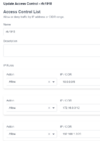
It could be. Since my phones are on the 192.168.10.x private network and my WAN public IP from Frontier is 192.138.x.x, perhaps it thinks they are on the same network. However, according to what I researched yesterday, FreeSwitch is supposed to base internal vs. external on what is set in Advanced > Access Control > RFC1918 and both systems have the same settings. FSPBX is on v 1.9.7.

I've gone through my internal and external SIP profiles line by line comparing FSPBX with FusionPBX and they are set the same and both systems have the same version of FreeSwitch. This is an oddity which is not service affecting. It is more of an inconvenience when I need to find the IP address of phone. I have to go into a router and look for the phone's MAC address to locate the IP.

The cloud system IP is in a completely unrelated IP space.
1787045157132.png
 
Last edited:
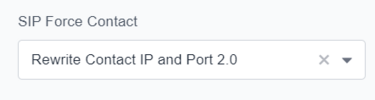
On the advanced screen of the extension, I've tried setting this:
1787048040477.png
which yields this on the registration report:
1787048165743.png
So that just puts the external IP address in both LAN and WAN fields and does not display the actual internal LAN IP.

None of the choices on the SIP Force Contact box (Or leaving it blank) yield the internal LAN IP on the registration report.
 
One more curious data point: I failed the router onto the backup cable modem port which has a very different IP address and still get that WAN IP address in the LAN IP field:
1787048870703.png
 
Al lot of this has nothing at all to do with freeswitch/fusionpbx/fspbx, etc

Let me give you an example, I've changed sensitive information on this one it is shown as just TCP, I guess that is because freeswitch doesn't know about the callid:

REGISTER sip:abc.xxx.com:5060 SIP/2.0
Via: SIP/2.0/TCP 109.182.22.128:12418;branch=z9hG4bK1553581440;rport
From: <sip:202@abc.xxx.com:5060>;tag=1503513578
To: <sip:202@abc.xxx.com:5060>
Call-ID: 0_1503577005@192.168.1.67
CSeq: 128 REGISTER
Contact: <sip:202@109.182.22.128:12418;transport=TCP>
Authorization: Digest username="202", realm="abc.xxx.com", nonce="fadce1ba-0630-44d1-b9ee-2d8e201f5767", uri="sip:abc.xxx.com:5060", response="5dd0a9b77732fb598c4fee4fded1ae13", algorithm=MD5, cnonce="1503742411", qop=auth, nc
0000108
Allow: INVITE, INFO, PRACK, ACK, BYE, CANCEL, OPTIONS, NOTIFY, REGISTER, SUBSCRIBE, REFER, PUBLISH, UPDATE, MESSAGE
Max-Forwards: 70
User-Agent: Yealink SIP-T48U 108.87.0.15
Expires: 120
Allow-Events: talk,hold,conference,refer,check-sync
Content-Length: 0

The one above 'leaks' the local IP in the Call-ID. FusionPBX may test for that, I cannot remember. This however is just a yealink thing its nowhere in the sip spec and they probably shouldn't really be doing it. Other than that there would be no way to determine the local ip of this extension.

You can usually get it from the via or contact as below, this one shows as TCP-NAT:

REGISTER sip:ccc.xyz.com:5060;transport=tcp SIP/2.0
Via: SIP/2.0/TCP 192.168.1.51;branch=z9hG4bKc212cc92304BC207
From: "210" <sip:210@ccc.xyz.com>;tag=5F2BD192-B47F3B07
To: <sip:210@ccc.xyz.com>
CSeq: 128 REGISTER
Call-ID: 82b95d99e8163d9dd348e63244cecbe2
Contact: <sip:210@192.168.1.51;transport=tcp>;methods="INVITE,ACK,BYE,CANCEL,OPTIONS,INFO,MESSAGE,SUBSCRIBE,NOTIFY,PRACK,UPDATE,REFER"
User-Agent: PolycomVVX-VVX_410-UA/5.9.7.4477
Accept-Language: en
Authorization: Digest username="210", realm="ccc.xyz.com", nonce="76d7cce4-4b87-4be4-9b39-36508197e1d6", qop=auth, cnonce="vJcqHoYXl3/27gN", nc=00000108, uri="sip:ccc.xyz.com:5060;transport=tcp", response="3c560887f59e
1115f160dd689a0953", algorithm=MD5
Max-Forwards: 70
Expires: 120
Content-Length: 0

 
Actually, I just got claude to look through the fusionpbx registrations.php

Here's how the lan-ip field gets determined, in app/registrations/resources/classes/registrations.php:237-261. The logic is a chain of fallbacks, applied per registration row pulled from FreeSWITCH's sofia status profile ... reg
XML/JSON output:

1. Primary source — the SIP Call-ID header (line 238-251)

Most SIP phones/soft-clients embed their local (LAN) IP as the domain portion of the Call-ID header, e.g. abc123@192.168.1.50. The code does:
$call_id_array = explode('@', $row['call-id'] ?? '');
If there's a part after the @, that's used as lan-ip, with two vendor-specific quirks patched afterward:
- Grandstream / Ooma phones encode the IP using hex-ish letters instead of digits (e.g. A.B.C.D instead of 0.1.2.3), so A-J are mapped back to 0-9.
- Gigaset Sculpture CL750A phones put underscores instead of dots in the Call-ID's IP portion, so _ is replaced with ..

2. Fallback for Snom phones — Contact header real= param (line 252-255)

If there's no @ in the Call-ID, it looks in the contact field for a real=x.x.x.x parameter (some Snom phones report their real/local IP this way via SIP Contact header extension) and extracts that IP.

3. Generic fallback — any IP-looking pattern in Contact (line 256-258)

If neither of the above matched, it just regex-searches the contact string for any dotted-quad IP pattern (\d{1,3}\.\d{1,3}\.\d{1,3}\.\d{1,3}) and uses the first match (also normalizing stray underscores to dots).

4. Otherwise — lan-ip is set to empty string.

Note this is distinct from network-ip (line 220/230-235), which is simply whatever FreeSWITCH reports as network-ip — i.e., the actual source IP the registration packet arrived from (the public/NATed IP as seen by the server). The LAN
IP is a best-effort attempt to recover what the phone thinks its own local IP is, parsed out of SIP headers rather than reported directly by FreeSWITCH.