recordings manager

dbz195

Member
Feb 3, 2021
87
5
8
38
I’m pretty sure I remember there being a place where I could edit AI generated recordings, possibly in the Recordings Manager.

Am I mistaken, or am I thinking of FusionPBX? I know FusionPBX has this option.
 
@dbz195 What do you mean by editing an AI-generated recording? Once it's generated, it's done. Any edits would require generating a new recording.
 
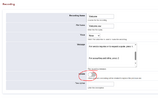
In FusionPBX, there is an option to go back and edit an existing recording without having to create a new one.

This works well for end users who only want to update the recording message without changing anything else.

If users have to create a new recording each time, they will also need to update the IVR greeting or ring group and to point to the new recording, which adds extra steps.

1784563714897.png
 
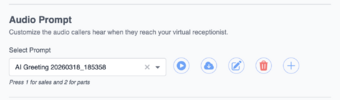
It can be done in FS PBX just as well, but through a different procedure. Instead of going to the Recording Manager, navigate directly to IVR or the ring group. Under the recording name, you can see the transcribed text. You can copy it and then click the plus button to add a new greeting. Paste the original text, modify it, and once you apply it, it will replace the original greeting. Basically the same procedure but done a bit differently. BTW, we were the first to introduce Text-to-Speech functionality for each module. FusionPBX folks followed our lead later.