Boy am I having fun with this 
I asked my wife to set up an inbound flow - to see how easy it would be for an end user. She got quite far without any form of documentation. A few notes:
- She wanted the call to go to a ring group, but that didn't exist yet. It would be nice to be able to create this directly from there. In this case, one has to go out, create the ring group, and then go back.
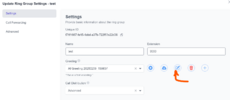
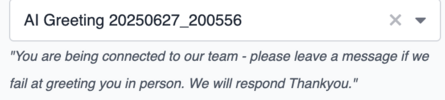
- The ring group was set up with a greeting using the text to speech function. Works like a bomb. The only issue is that when you want to select a greeting, you only see the file name, not the description. So on a PBX with 15 greetings, you would have to guess which one is the correct one, or play them one by one to find it, or go to greetings and see which file name corresponds with the correct one. It would be great if a description is shown there so that the end user knows exactly which one to choose.
- She (and neither could I) could no figure out how to record a greeting not related to a ring group using the text to speech function. When you go to "recordings" in the menu it goes to the old fusion page. So we got around that by just recording it as part of a ring group, and then to use it somewhere else.
I am aware it's all a work in progress so not a big deal and I'm sure the fusion pbx menus will vanish over time.
I asked my wife to set up an inbound flow - to see how easy it would be for an end user. She got quite far without any form of documentation. A few notes:
- She wanted the call to go to a ring group, but that didn't exist yet. It would be nice to be able to create this directly from there. In this case, one has to go out, create the ring group, and then go back.
- The ring group was set up with a greeting using the text to speech function. Works like a bomb. The only issue is that when you want to select a greeting, you only see the file name, not the description. So on a PBX with 15 greetings, you would have to guess which one is the correct one, or play them one by one to find it, or go to greetings and see which file name corresponds with the correct one. It would be great if a description is shown there so that the end user knows exactly which one to choose.
- She (and neither could I) could no figure out how to record a greeting not related to a ring group using the text to speech function. When you go to "recordings" in the menu it goes to the old fusion page. So we got around that by just recording it as part of a ring group, and then to use it somewhere else.
I am aware it's all a work in progress so not a big deal and I'm sure the fusion pbx menus will vanish over time.